How to get a digital vehicle license
Digital vehicle licenses were first piloted in Shanghai starting July 1, 2024, and have been rolled out nationwide since Dec 2, 2024. Here is a step-by-step guide to obtaining a digital vehicle license.
Step 1: Download app & Register
1. Download the "交管12123" (Traffic Management 12123) app on your mobile phone's app store.

2. Click "user registration", find the "type of document" segment, then choose "F foreigner's identification document" and then "foreigner's identification document".
3. Enter personal information, including document (passport) number, name and mobile phone number.


Step 2: Enter your mobile phone number and password to log in.
Step 3: Individual vehicle owners can click the "digital licenses" icon on the home page.

Step 4: Then click the "apply" button to submit your application.


If you are a corporate user, after logging into the app, switch to the corporate account version in the top-right corner of the homepage and click the motor vehicle list on the home page.
Note: First-time users will be required to complete a face-recognition process.

From there, you can access the "motor vehicle details" page and select "digital vehicle license" to apply.

How to use the digital license
Enter the "digital licenses" segment, then select the relevant license icon from the list to display it.


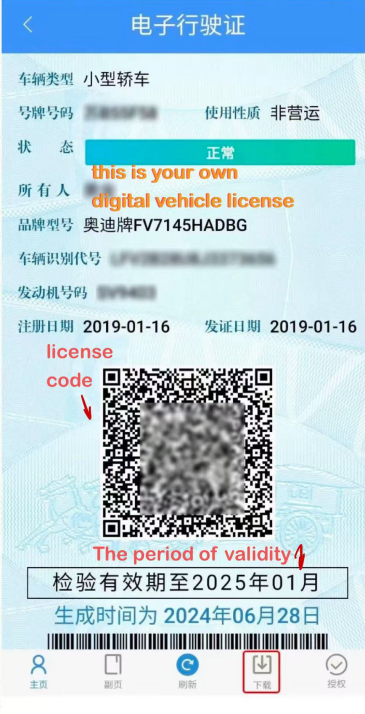
How to download the digital vehicle license
Step 1: Locate the download option below the license display page.

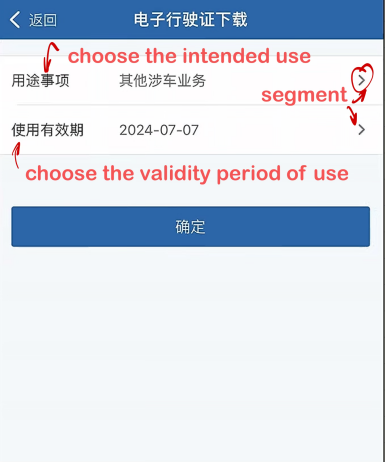
Step 2: After entering the "download" segment, choose the intended use and validity period before downloading.
Step 3: Click on the "confirm" option to download the license.
Note: You may apply for a digital vehicle license only if your vehicle is officially registered in Shanghai and has a local license plate. Temporary-entry foreign vehicles are not eligible.
Updated July 24, 2026
Source: Ministry of Public Security